
A Complete Guide to iPhone Battery Replacement: DIY or Professional Service
The iPhone is one of the most popular smartphones in the world, known for its sleek design, powerful performance, and extensive ecosystem. However, like all electronic devices, iPhones are not immune to wear and tear, especially when it comes to the battery. Over time, you may notice that your iPhone drains faster, charges more slowly, or shuts down unexpectedly. This is where iPhone Battery parts becomes essential. Understanding the options for replacing your battery, whether at home or at a professional shop, can help you make an informed decision and extend the life of your device.
Signs You Need an iPhone Battery Replacement
The first step in deciding whether to replace your battery is recognizing the signs of a failing iPhone battery. Some common indicators include:
- Rapid Battery Drain: If your iPhone loses a significant amount of charge within a short period, it may indicate that the battery is deteriorating.
- Unexpected Shutdowns: Devices with older batteries can power off even when the battery shows a reasonable charge.
- Slow Charging: A battery that takes unusually long to charge might be weakening.
- Overheating: If your iPhone becomes unusually warm during use or charging, the battery could be compromised.
- Battery Health Warnings: iPhones running iOS 11.3 or later display battery health information in settings. If your maximum capacity falls below 80%, iPhone Battery Replacement is often recommended.
Recognizing these signs early can help prevent more serious problems, such as a complete battery failure or damage to internal components.
iPhone Battery Replacement at Home
Replacing an iPhone battery at home can be a cost-effective option if you have the right tools, knowledge, and patience. However, it requires careful handling to avoid damaging the device. Here’s what you need to know:
Tools and Materials Needed
To replace an iPhone battery at home, you typically need the following:
- Replacement battery compatible with your iPhone model
- Pentalobe screwdriver
- Suction cup or opening tool
- Tweezers
- Spudger or plastic pry tool
- Adhesive strips for securing the new battery
It’s crucial to use high-quality tools and batteries, preferably from reputable suppliers, to ensure safety and performance.
Steps for Replacement
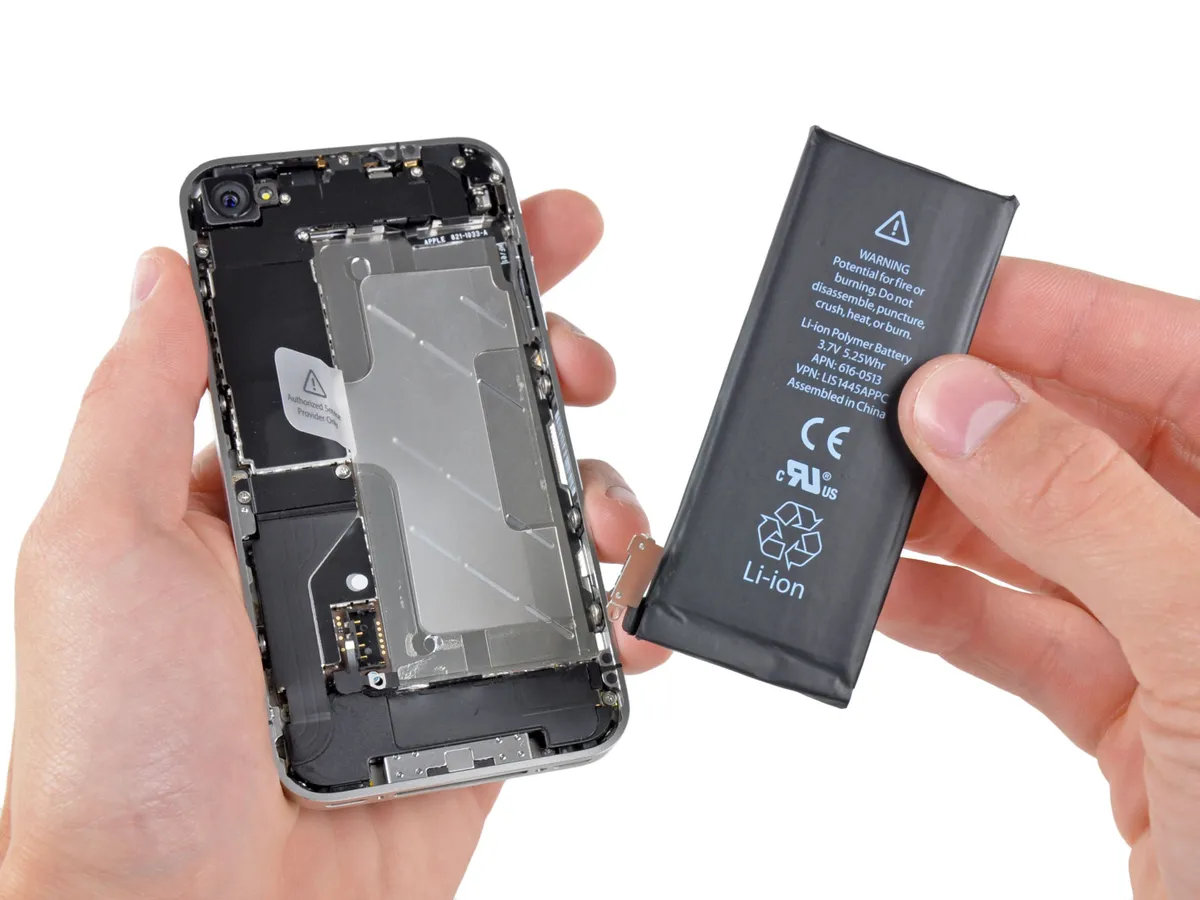
While exact steps vary by iPhone model, the general process involves:
- Powering off the iPhone.
- Removing the screws near the charging port.
- Using a suction cup to lift the screen carefully without damaging connectors.
- Disconnecting the battery from the motherboard.
- Removing the old battery, which may be glued in place.
- Installing the new battery and reconnecting it.
- Sealing the device back together and testing for proper function.
It’s important to handle all components delicately, as iPhones have sensitive connectors and fragile screens. Improper handling could lead to permanent damage, voiding any warranty.
Advantages and Risks
Replacing a battery at home can save money and give you control over the process. However, there are risks involved:
- Potential damage to internal components
- Voiding warranty if the device is still under Apple coverage
- Safety hazards if the battery is punctured or mishandled
Therefore, only attempt an iPhone Battery Replacement at home if you feel confident and follow a reliable guide.
iPhone Battery Replacement at a Professional Shop
For many users, taking the iPhone to a professional shop is a safer and more convenient option. Apple Stores and authorized service providers offer certified battery replacements that ensure your device operates as intended.
Official Apple Replacement
Apple provides iPhone Battery Replacement services for all models. Benefits of using Apple include:
- Genuine Batteries: Apple uses high-quality, original batteries that maintain the phone’s performance and safety.
- Warranty Protection: Replacing your battery at Apple does not void your warranty and may even extend it in some cases.
- Expert Service: Trained technicians handle the replacement, reducing the risk of damage.
Apple’s replacement cost varies depending on your iPhone model and warranty status, but it is generally competitive considering the quality of service.
Third-Party Repair Shops
If an Apple Store is not accessible, many third-party repair shops provide iPhone Battery Replacement services. When choosing a shop, consider:
- Reputation and customer reviews
- Use of high-quality or OEM-equivalent batteries
- Warranty on the replacement service
- Expertise with specific iPhone models
Third-party services can sometimes offer faster turnaround times and lower prices, but quality and safety should always be a priority.
Advantages and Risks
Professional battery replacement ensures safety, reliability, and proper installation. The risks are minimal compared to home replacement, but costs may be higher, and some third-party shops might use lower-quality batteries. Always verify the credentials and reviews of any repair provider.
Maintaining Your New iPhone Battery
Once you’ve replaced your battery, proper care can extend its lifespan:
- Avoid Extreme Temperatures: iPhone batteries perform best between 0°C and 35°C (32°F and 95°F).
- Optimize Charging Habits: Avoid letting your battery drain completely frequently and unplug once fully charged.
- Use Original Chargers: Certified charging accessories help prevent battery stress.
- Enable Optimized Battery Charging: iOS includes a feature that slows down battery aging by learning your charging habits.
- Monitor Battery Health: Check battery settings periodically to ensure capacity remains stable.
Consistent maintenance can delay the need for another iPhone Battery Replacement and improve overall device performance.
Conclusion
iPhone Battery Replacement is a critical aspect of maintaining your device’s performance and longevity. Whether you choose to replace it at home or seek professional service, understanding the signs of battery degradation, the replacement process, and proper battery care can save you time, money, and frustration. Home replacement offers control and cost savings but comes with risks, while professional shops provide security, expertise, and warranty protection. Regardless of the method, a healthy battery ensures that your iPhone continues to function reliably, keeping you connected in an increasingly digital world. Taking proactive steps now can prevent unexpected shutdowns, slow performance, and extend the life of your valuable device.
iPhone Battery Replacement is not just a technical task; it’s an investment in your device’s future, ensuring that your smartphone remains a dependable companion for years to come.